
Linking Two Speakers
-
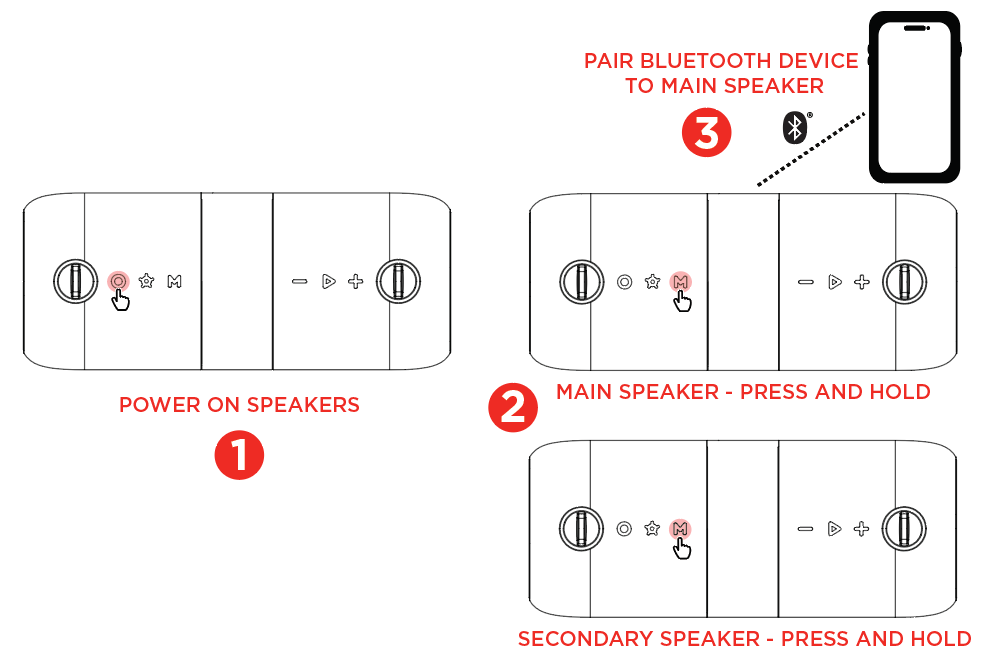
Power on both speakers and make sure they are in Bluetooth mode.
-
Press and hold the Mode button on each speaker to enter stereo-linking mode (tone plays, flashing white LED).
-
Allow up to 60 seconds for the speakers to successfully link (LED solid white, tone plays).
-
The primary speaker (the speaker on which the Mode button was pressed and held first) will enter Bluetooth pairing mode (flashing white LED).3. Connect Bluetooth device to primary speaker.Note: When the music is paused or stopped, the LED will become solid white within 2-3 seconds.Press the Power button on the primary speaker to turn off both speakers. Press the Power button on the secondary speaker to only turn off the secondary speaker.
Once linked, press and hold the Mode button on either speaker to disconnect.