
Pairing a Bluetooth Device
-
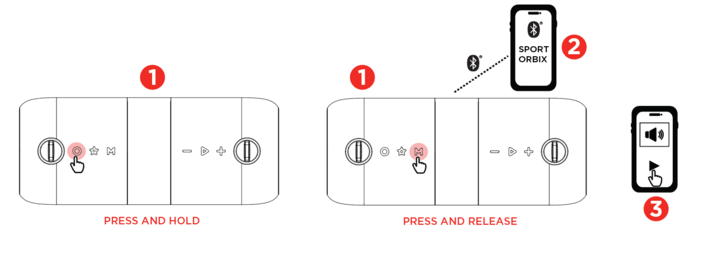
Press and hold the Power button to power on the speaker. The speaker will automatically enter Bluetooth pairing mode. Press and release the Mode button if not in Bluetooth mode to switch to Bluetooth mode.
-
Choose “Sport Orbix” in your Bluetooth settings menu.
-
Press Play in music player App of choice on device.
-
Press - or + to adjust volume.
-
Press the Play/Pause button to start or stop audio.
-
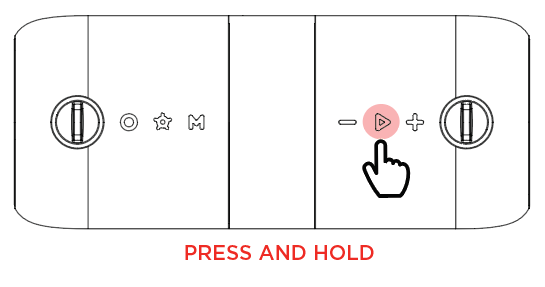
Press and hold - / + buttons to navigate tracks.Press and hold the Play/Pause button to disconnect from the current Bluetooth connection.
Make sure your device volume is turned up.
To start or stop audio playback, press the Play/Pause button.
To navigate tracks, press and hold the - / + buttons.
To disconnect from the Bluetooth connection, press and hold the Play/Pause button.
Hands-free Calling
-
When connected via Bluetooth and receiving an incoming call, press and release the Play/Pause button to accept the call or press and hold Play/Pause to reject the call.
-
During the call press and hold Play/Pause to switch from using Sport Orbix’s internal mic to the phone’s mic.
-
Press and release Play/Pause to end the call.
Voice Assistant
-
Ensure the speaker is connected to your smartphone via Bluetooth.
-
Double-press the Play/Pause button to activate your device's voice assistant.