
Pairing a Bluetooth Device
-
Press and hold the Power/Play/Pause button to power on the speaker.
-
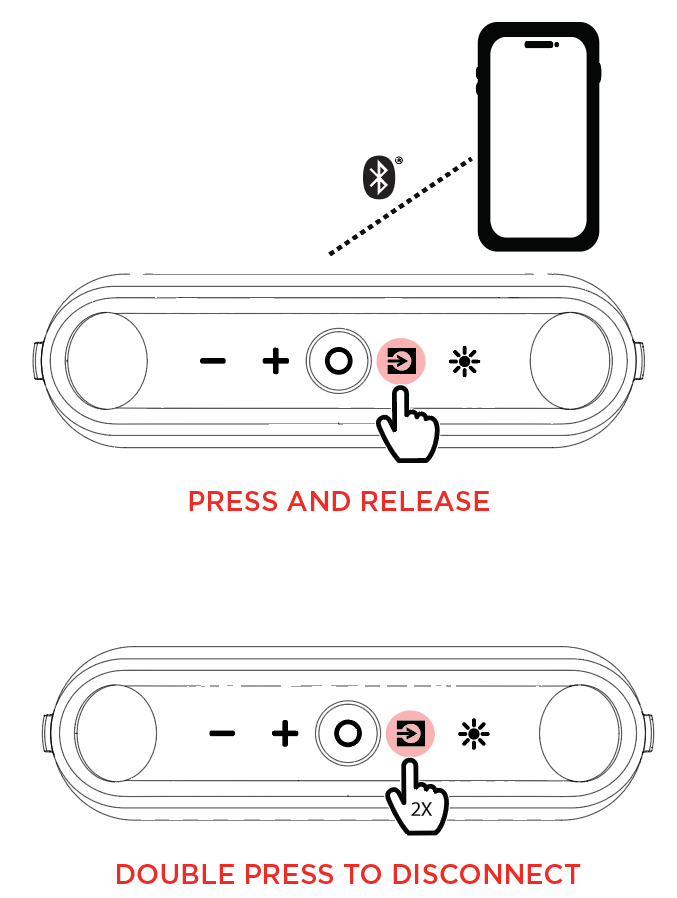
When the unit is first turned on, it will automatically enter Bluetooth pairing mode. If necessary, press and release the Source button to toggle through and select Bluetooth mode.
-
Navigate to your device’s Bluetooth setup screen, find KETTLEBOOM, and connect. If voice prompts are enabled, you will hear “Bluetooth Connected”.Note: If your Bluetooth device prompts for a pairing code, enter “0000”.
-
To connect a second Bluetooth device, navigate to your device’s Bluetooth setup screen, find KETTLEBOOM, and connect.
-
Press Play in music player App of choice on device. Make sure your device volume is turned up.
To start or stop audio playback, press the Power / Play/Pause button.
To navigate tracks, press and hold the - / + buttons.
To disconnect from the current Bluetooth connection, double-press the Source button.