×

Features


See the following Top Panel and Rear Panel sections for detailed feature explanations.


Top Panel


Features
1

Power Button

 
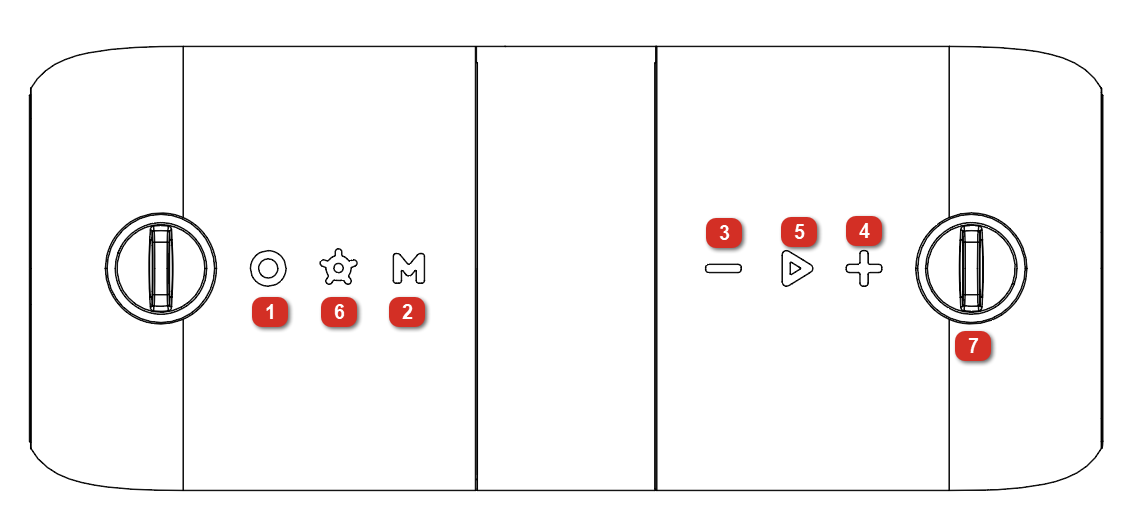
1. Power Button
 
To power Sport Orbix on or off, press and hold this button.
To enable or disable voice prompts, double-press this button.
Note: After 10 minutes of no audio playing, the speaker will power off. Press the Power button to turn the speaker back on.
To enable or disable voice prompts, double-press this button.
To start or stop audio playback when in Bluetooth or USB mode, press this button.
 
 
2

Mode

 
2. Mode
 
Press and release to switch between Bluetooth and USB sources. The USB modes are only accessible when a cable/USB drive is connected to the speaker. If you are connected to a smartphone, double-press this button to disconnect from the smartphone.
Note: USB mode is only accessible when cables are connected to the ports.
 
For more information on these modes, see the following sections:
 
3

- Button

 
3. - Button
 
To lower the volume in all playback modes, press and release this button.
To skip the previous track, press and hold the - button.
To reset the speaker to factory default settings and clear Bluetooth memory, press and hold the - button for 5 seconds.
 
4

+ Button

 
4. + Button
 
To raise the volume in all playback modes, press and release this button.
To skip to the next track, press and hold the + button.
 
5

Play/Pause Button

 
5. Play/Pause Button
 
To start or stop audio playback when in Bluetooth or USB-A playback mode, press this button.
 
Hands-free Calling Mode:
Press and release this button to answer a call, or press and hold the button to reject the call. During a call, press and hold this button to switch the audio between the Sport Orbix and your smartphone. To end the call, press and release this button or hang up from your smartphone.
 
Voice Assistant Mode:
Double-press this button to activate your device's voice assistant.
 
6

Light Switch Button

 
6. Light Switch Button
 
To switch between light modes, or to turn the lights off, press this button. Press and hold this button to turn the lights off quickly.
See the Light Modes section for more information.
 
7

Shoulder Strap Clip

 
7. Shoulder Strap Clip
 
Secure the strap clasp to each side of the clips on Sport Orbix. Then adjust the strap buckle to the desired length.
See the section Using the Adjustable Shoulder Strap for more details.


Rear Panel

Note: Pull the tab on the protective rubber panel to release it and access the USB ports.

Features

1

USB-A Port

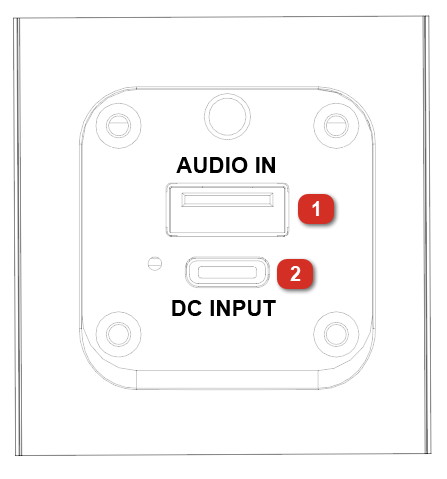
1. USB-A Port
 
Connect your USB flash drive here to play music.
Note: Your USB flash drive cannot be more than 128 GB and it must contain playable supported files. When you connect a USB flash drive with supported files, Sport Orbix will play back the files in the order they were added to the USB flash drive.
The USB-A port supports playback only and cannot be used to charge devices.
See the USB Playback Mode section for more details.
2

USB-C Port

2. USB-C Port
 
To charge the speaker, connect the included USB-C® to USB-C® cable from this port to a USB power adapter (5 V DC, 2 A, or 5 V 3 A, not included) connected to a power outlet, or to your powered-on computer.
The USB-C port supports charging only and cannot be used to stream audio from devices.