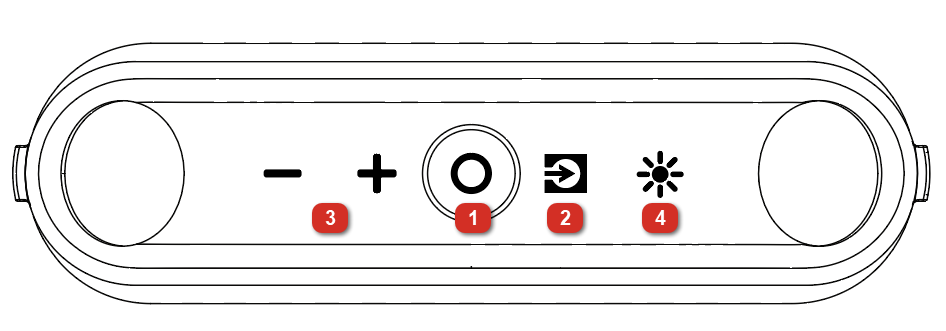
Press and release to switch between Bluetooth, USB-A, and USB-C sources. If you are connected to a smartphone via Bluetooth, double-press this button to disconnect from the smartphone.
Note: USB mode is only accessible when cables are connected to the ports.
For more information on these modes, see the following sections:
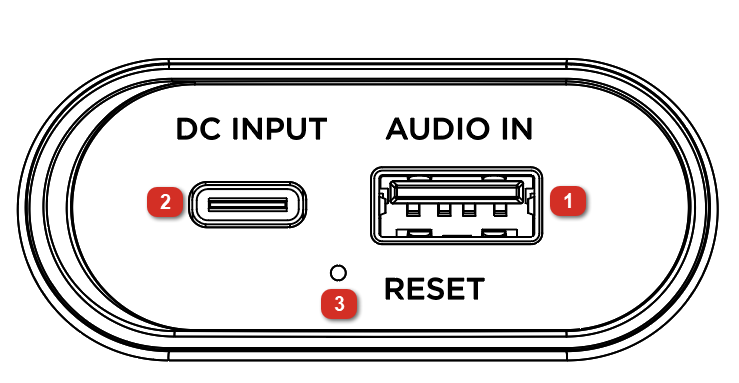
Note: Pull the tab on the protective rubber panel to release it and access the USB ports.
USB-A Port
Connect your USB flash drive here to play music.
Note: Your USB drive cannot be more than 128 GB and it must contain playable supported files. When you connect a USB drive with supported files, KettleBoom will play the files in the order that the files are stored on the USB flash drive.
To charge the speaker, connect the included USB-C® to USB-C® cable from this port to a USB-C® power adapter (25W or larger, not included) connected to a power outlet, or to your powered-on computer.
You can also stream audio from your device and use the buttons on KettleBoom to control playback/pause, previous/next track, and volume.
Note: The USB-C® port will not play music from a USB-C® flash drive.
With a small pin, press and hold the reset button for eight seconds. The speaker will hard reset while still remembering the previous setting and memory.
Note: Press and hold the - button for 5 seconds to reset KettleBoom to factory settings and clear the Bluetooth memory. The speaker will power off. Then press and hold the Power / Play/Pause button to power the speaker back on.